
How is it different from a conventional Kanban board?
On a conventional board, people do the bookkeeping. Someone creates the card, writes the description, drags it across columns, and remembers to update it. When agents do the work, that bookkeeping falls back on you.
An agent-native board changes three things.
Agents are trusted editors. Agents create and edit Items, write Specs and Plans, move work between Statuses, and keep each next action current. They do this through structured tools, not by pasting text into a form.
The human owns the decisions. You own intent, priority, and acceptance. Agents do not silently redefine the project, and they do not declare consequential work accepted. You decide when something is Complete.
The board is the shared planning truth. Chat transcripts scroll away and differ between threads and agents. The board is the one place where every agent and you see the same state. A new thread can start from the board instead of rediscovering the project.
What are the building blocks?
Planban uses a small, fixed vocabulary. It is strict about what each term means and flexible about how you work.
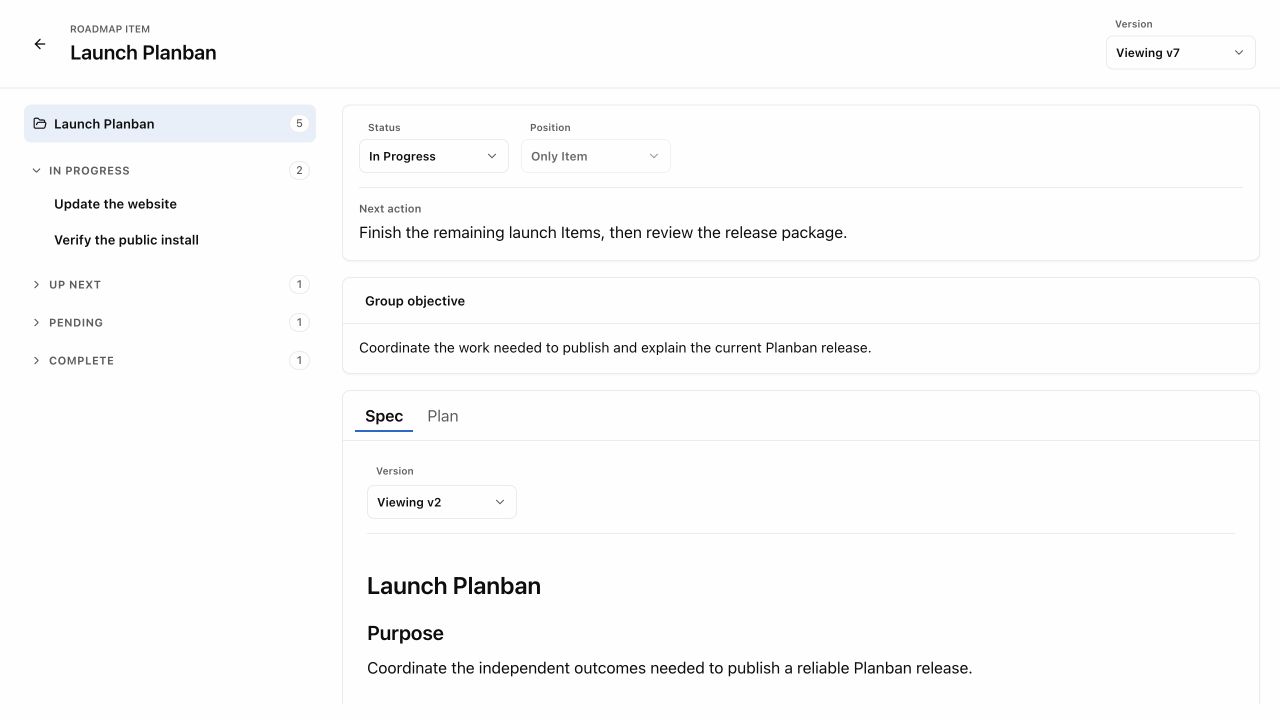
- Item. One outcome that can be completed on its own: a feature, a bug, a release, a piece of research.
- Group. Several related Items that contribute to one larger outcome. Each Item in a Group stays independently ranked, documented, and completable.
- Status. Where an Item is up to. Planban's columns are Pending, Up Next, In Progress, and Complete.
- Spec. What the Item is for: its purpose, scope, and acceptance.
- Plan. How the work will be carried out and verified, when the work is complex enough to need one.
- Next action. The one thing that happens now, and who does it.
These layers keep the top of the board readable. You see concise cards first. Detail appears when you open an Item. The Planban docs explain Items and Groups in full.
What does it look like in practice?
Planban is an agent-native Kanban board for Codex and Claude. Here is a typical walk-through in one project.
- You describe the work. In a Codex or Claude thread you write: "Users want to export their data as CSV. Add it to the plan."
- The agent creates an Item. It adds a Pending Item called "CSV export" with a short summary and a proposed priority. It writes a Spec covering scope and acceptance, and sets the next action to "Owner: confirm which fields to include."
- You decide. You open the board with
/pbin Codex or/planban:pbin Claude Code. You see the new Item beside the rest of the project, answer the question in the thread, and move it to Up Next. - The agent does the work and keeps the card current. It writes a Plan, moves the Item to In Progress, and updates the summary and next action as it goes. If it gets stuck, the card says so.
- You accept it. When the agent reports the work is ready, the next action asks you to review. You check it and mark it Complete. The agent does not do that for you.
A week later, a different thread or a different agent can pick up where things stand. It reads the board, not an old transcript.
Where does the data live?
In Planban, planning state stays on your machine. Discovery files sit in .planban/ in your repo, and live board state sits under ~/.planban, separate from your source code. Local Mode is complete. Online Mode, which adds remote access to your own board, is in design.
What is an agent-native Kanban board not?
It is not a replacement for everything a team uses to manage work. Planban in particular is not:
- a full team or enterprise project-management suite;
- a Linear, Jira, Basecamp, Trello, or Notion clone;
- a sprint, reporting, or role-matrix system;
- a general personal to-do or calendar app;
- an autonomous-agent fleet manager or model gateway.
Planban is built for one person directing continuing project work with one or more agents. If your main need is team coordination, sprint planning, or reporting to stakeholders, a team tool will serve you better. You can still bring context from those tools into Planban by asking your agent to turn it into draft Items.
How do I try it?
Planban v1.1.6 installs as a plugin in Codex and Claude Code. Any other MCP host can use the same tools and open the board as a link. It is open source under the MIT licence.